
Last updated: April 10, 2025
Sales Hub Enterprise users can create a quote-based workflow to automate your business process. Create a new task or update property values based on a quote or its associated deals.
- In your HubSpot account, navigate to Automations > Workflows.
- the upper right, click Create workflow.
- In the left pane, select Quote-based as your workflow type.
- Click the pencil icon to give your workflow a name, then click Create workflow.

- In the workflow editor, click Set enrollment triggers.
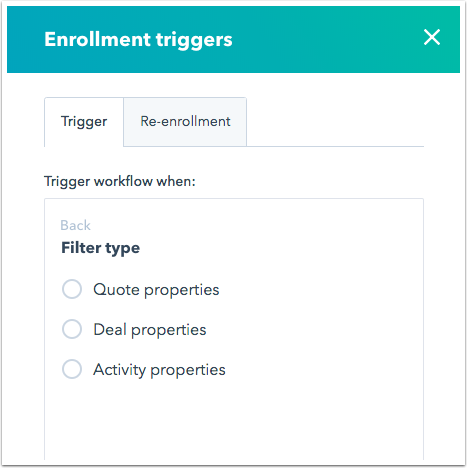
- In the right pane, select a filter type to use property values from a quote or associated deal records as criteria for enrollment. When you're done, click Save.
- Click the plus icon + to add a workflow action. In a quote-based workflow, you can do the following:
- Add a delay between workflow actions.
- Set a property value for the quote or its associated deals.
- Copy a property value for the quote or its associated deals.
- Clear a property value for the quote or its associated deals.
- Create a task.
- Send an internal email notification.
- Send an in-app notification.
- Choose your action, then click Save.
- Click the plus icon + to add more workflow actions as needed.

- When you're done, click the Settings tab.
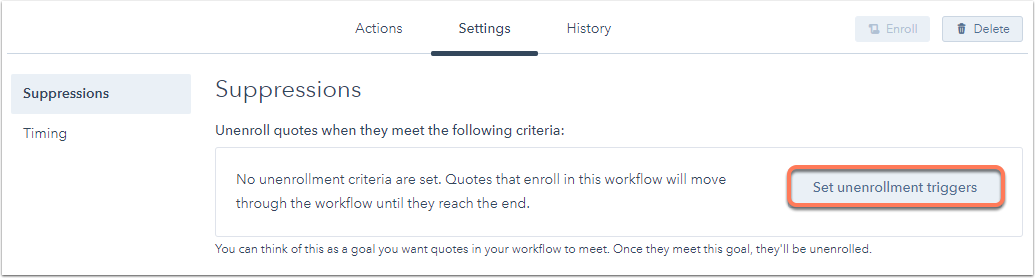
- To unenroll quotes that meet a certain criteria from the workflow, click Set unenrollment triggers.
- In the right pane, select a quote or associated record property for your unenrollment trigger(s).
- Click Apply filter, then click Save.
- In the left, click Timing.
- To specify times for the actions to take place, select Specific times. You'll see the days of the week.
- Click the days for the actions to take place. You'll see two dropdown menus.
- Under each day, click the left dropdown menu and select when the actions should start taking place.
- Under each day, click the right dropdown menu and select when the actions should stop taking place.

- At the bottom of the screen, click Save.
- When you're done setting up your workflow, click Review in the top-right corner. Review the workflow settings, then click Turn on.
Please note: when a quote-based workflow is turned off, all records enrolled in the workflow will be unenrolled. This includes any quotes that are in a delay when the workflow is turned off.
Learn how to create a contact-based workflow, a company-based workflow, a deal-based workflow, and a ticket-based workflow.